From the moment an incident is raised to the Root Cause Analysis landing in your client's inbox, Composure drafts every step of the client communication and your team approves it.
First update drafted the moment the incident is raised, a separate message for every contact at every affected customer, ready for a person to review and send.
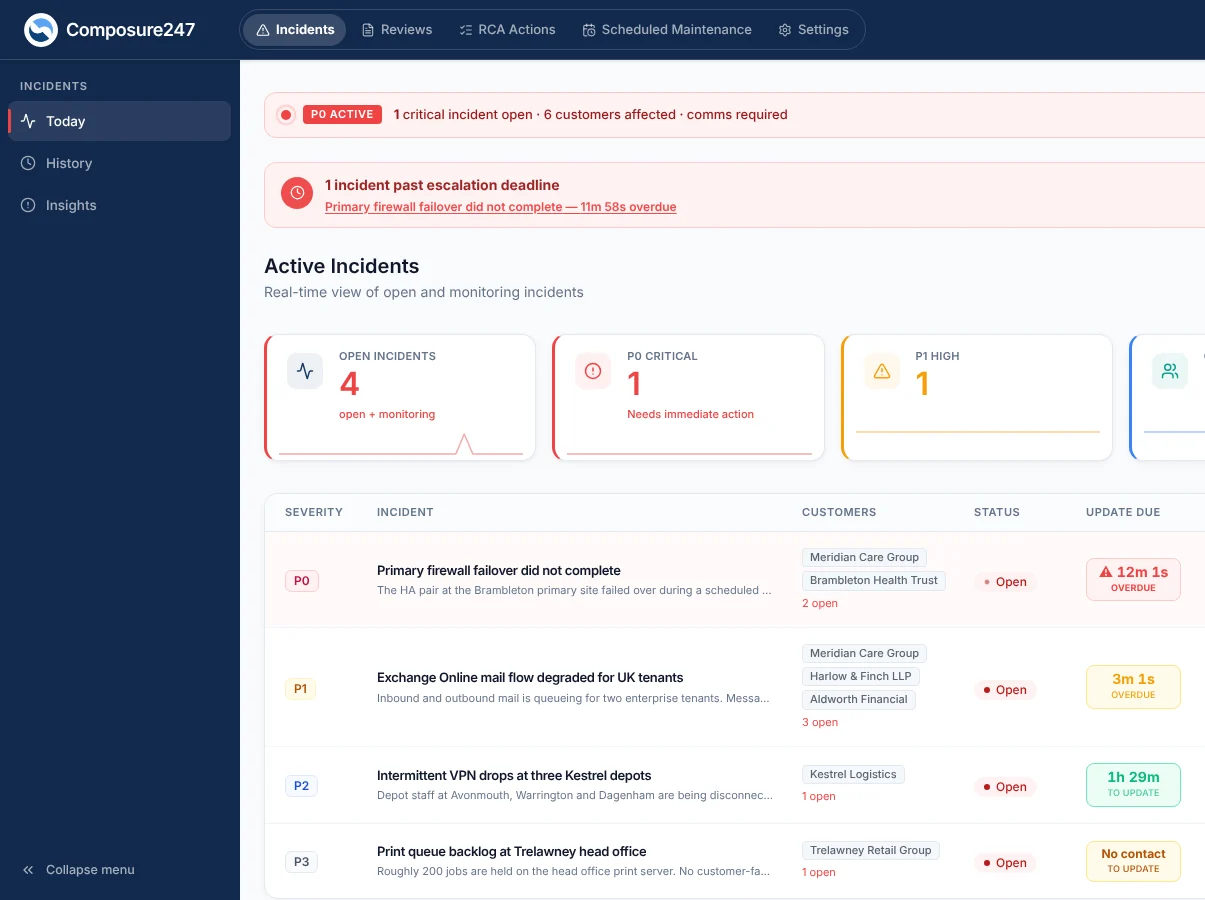
Raise a P0 to P3 incident in seconds in Composure, or confirm one HaloPSA suggests. Opening updates are drafted for every contact instantly, ready for review.
Severity sets how often each customer is updated, from every 30 minutes for a P0 by default. You can change the intervals to match what you have promised.
When HaloPSA raises a ticket that belongs to an incident you are already running, attach it to that incident instead of opening a second one.
See every open incident and the customers it affects, with banners for open P0s and overdue escalations, so nothing falls through the gaps.
Set your rules for terminology, length and tone once. Every AI draft follows your house style, and a person still reviews it.
Engineers' notes stay internal unless they are marked for customers. Only notes marked for customers are turned into drafts, and a person reviews those before they go.
Each affected customer runs on their own update clock, with a reminder 5 minutes before an update is due. No news yet? Draft an honest holding update on request.
Admins can pause all email or SMS for the organisation instantly, for 1, 4 or 24 hours or until resumed, with automatic resume.
The AI is instructed to keep internal hostnames, blame and speculation out of customer updates. A person reviews every update before it is sent, and RCAs get a liability check (Communicate).
Updates are sent from our authenticated domain, which passes SPF, DKIM and DMARC checks, so they reach inboxes rather than spam folders.
See what was sent, when, and whether it went or failed, for every communication to every contact.
Customise your resolution and RCA-delivery emails with placeholders such as the contact's first name, the customer name and the incident title.
Incident updates by email, SMS (UK mobiles) and WhatsApp, and in the customer portal; WhatsApp only to contacts who have agreed to it; maintenance notices by email and portal. Available on every plan.
A private, co-branded portal where customer contacts sign in, follow live incidents, reread updates, see planned work and download RCAs. Your colours and sign-in page on Communicate.
A CTO, a Finance Director, and an IT Manager need entirely different information from the same incident. Composure drafts a separate update for each, calibrated by job title.
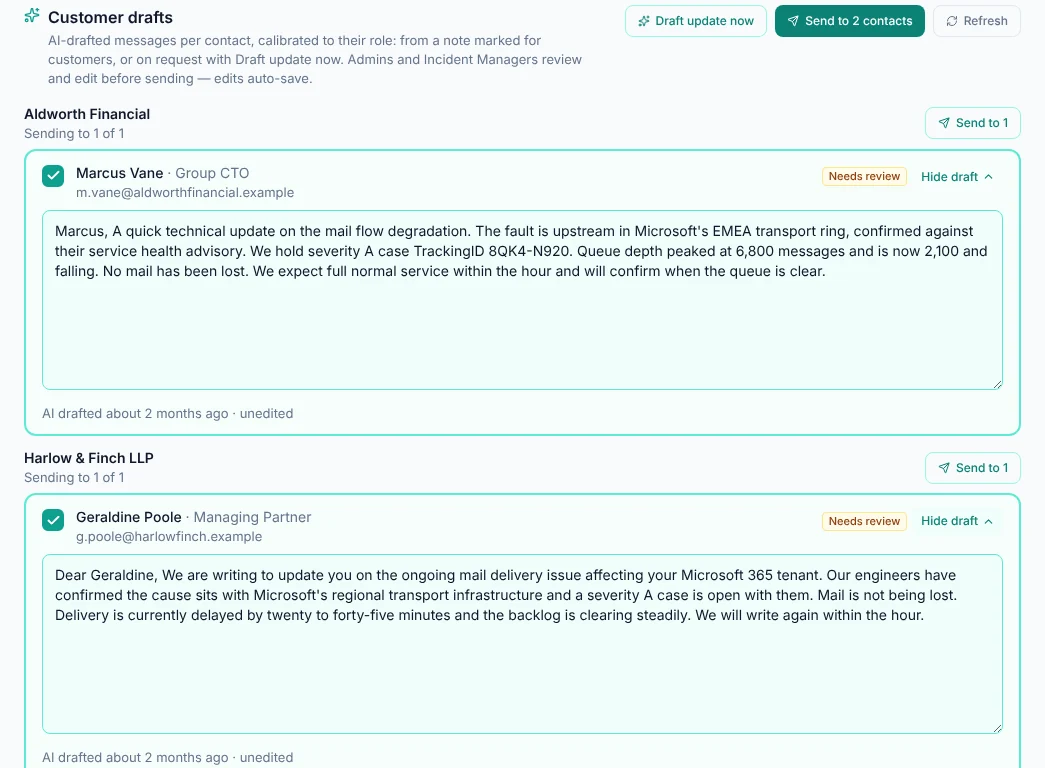
A complete record of every customer, contact, job title and channel. All the context Composure needs to write the right message for the right person. HaloPSA contacts sync nightly.
Choose which channels each contact receives (email, SMS, WhatsApp, RCAs). Update frequency is set per customer and severity, and Composure keeps to it every time.
Each message is genuinely different, not the same message adjusted slightly. Different content, tone, and level of detail per recipient role.
Before sending, preview exactly what each contact will receive. Edit individual messages without affecting others, full human control before anything goes out.
See every message that went out: who it went to, when, and whether it sent or failed. Know immediately if a key stakeholder wasn't reached, and act before they call.
Every send is recorded as sent or failed, so you can see who wasn't reached and resend.
Your Account Manager should never find out about a P1 from the client. Composure briefs them automatically after every customer update.
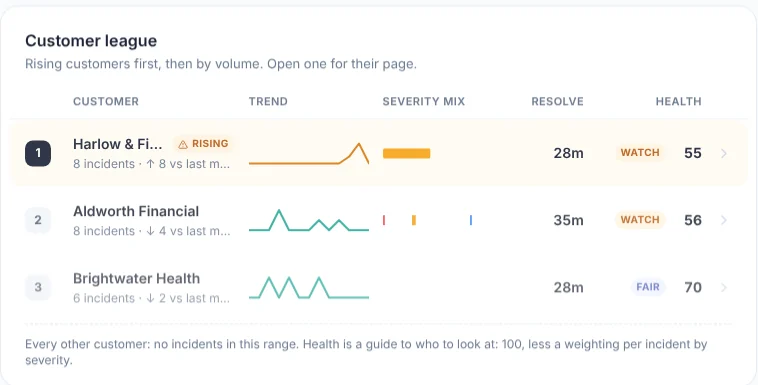
Account Managers and CSMs are briefed automatically each time a customer update is sent, so your relationship team is ready for the client's call.
Composure reminds your team 5 minutes before a customer update is due, chases drafts left unsent, and pages the escalation contact by SMS or email if an update is missed.
HaloPSA ticket notes arrive as incident notes every 10 minutes, labelled by who wrote them, giving the AI the facts it needs to draft accurate updates.
A customer health league, incident trends, and comms in window: how often each customer's updates went within the promised interval. Ready for your service reviews.
Routine work, upgrades, migrations. Composure turns your internal reason for the work into a customer-safe notice for each customer, and you approve it once.
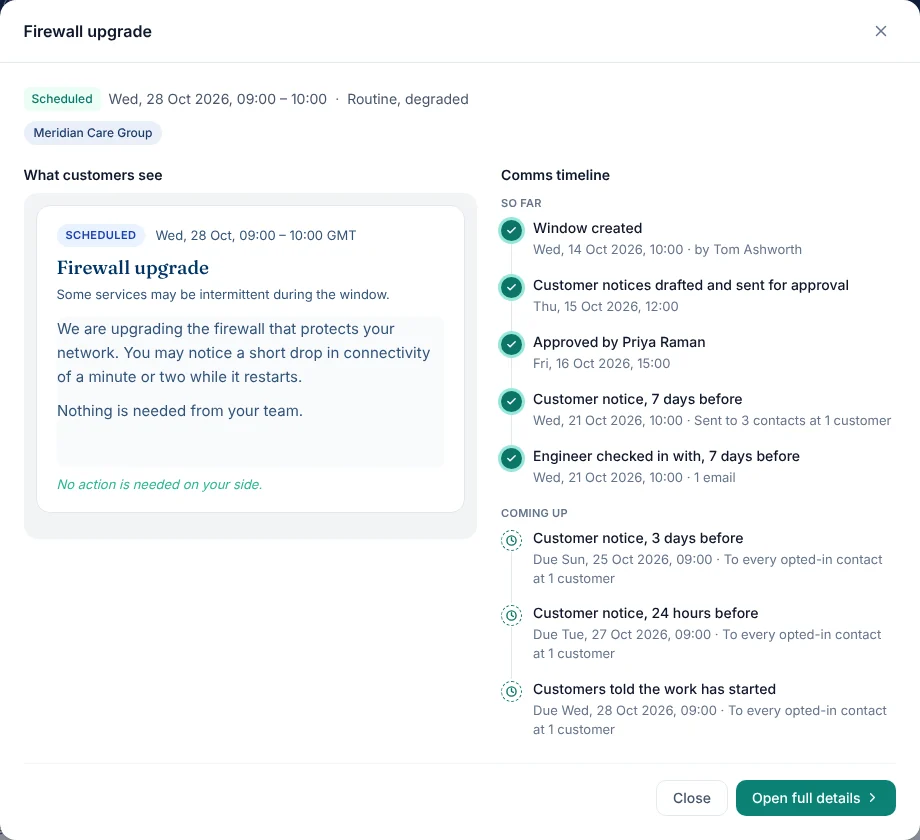
The AI drafts each customer's notice in your house style. A maintenance approver approves it, and the scheduled notices then go out without further work.
Notices go out by email and portal 7 days, 3 days and 1 day before, at the start, and on completion. Reschedules, postponements and cancellations are drafted too.
Recurring maintenance windows (weekly, fortnightly or monthly) with automatic notices 7, 3 and 1 day before and at the start (Communicate).
The engineer gets a check-in at each milestone. Approvers are chased until the notices are approved, and if a window starts without approval the team is alerted, then your executive sponsors.
Mark the work complete and customers get a completion notice. If a window passes its end time without being closed, the engineer and incident manager are chased until it is.
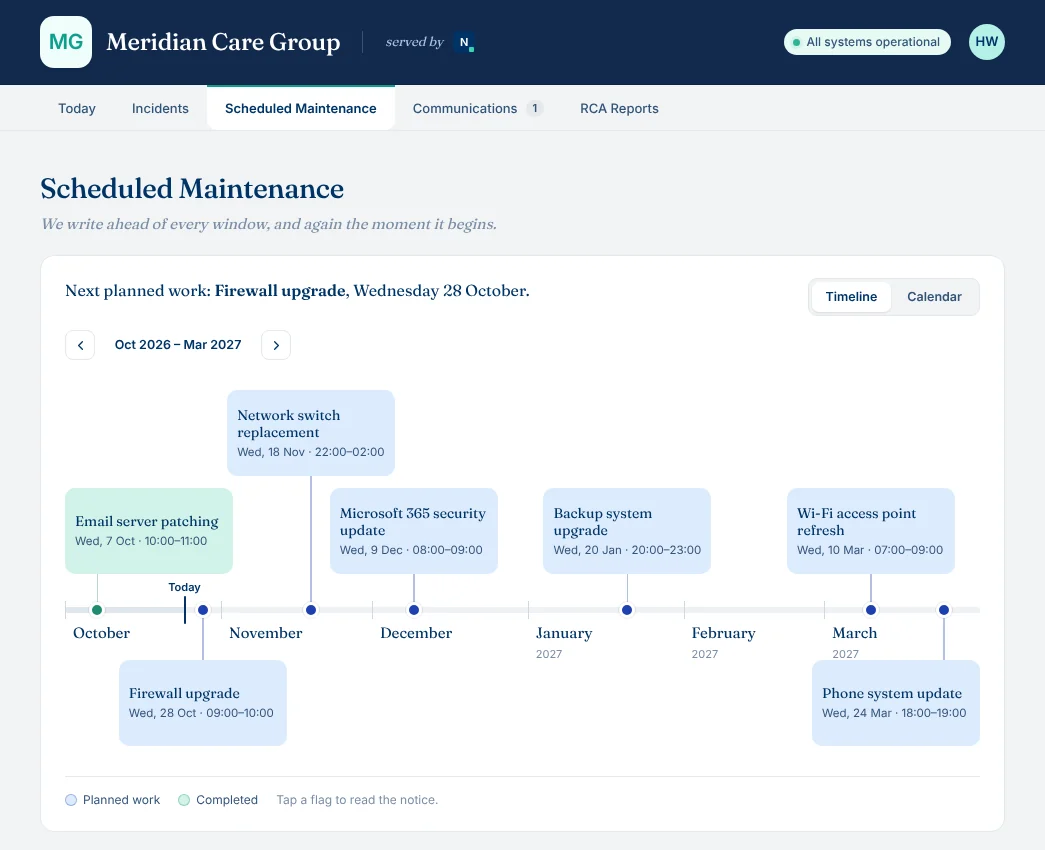
See every window on a timeline or calendar, filter by customer or status, and open any window to read the notice as the customer sees it, with every notice sent and still to come.
Root Cause Analyses can take days to pull together. Composure drafts the RCA from the real timeline and comms log, and chases it until it is sent, 48 hours after resolution by default.
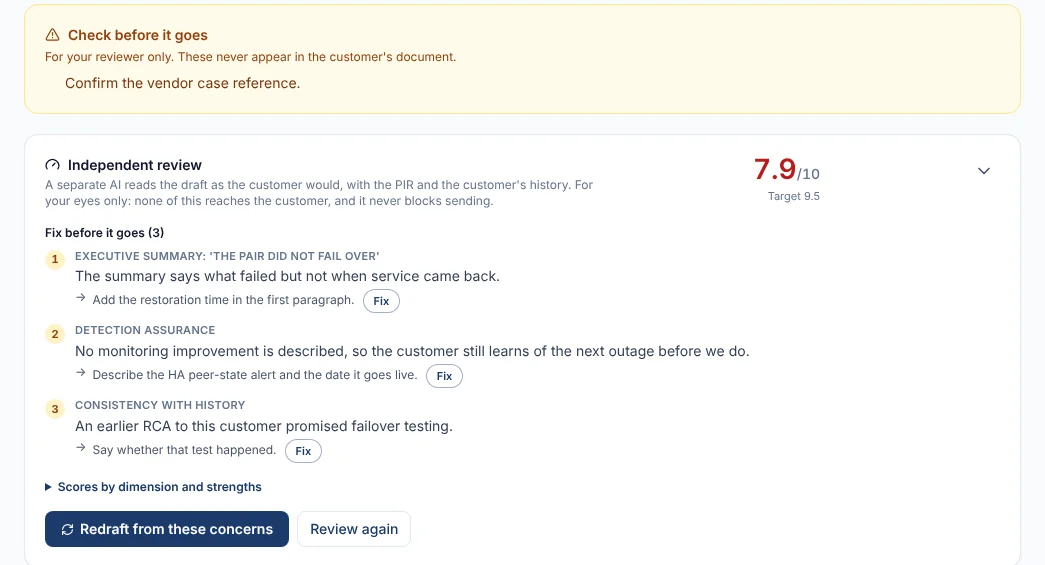
The engineer and incident manager answer a short PIR form (or upload one). The AI drafts the RCA with the real timeline and comms log, ready for your team to edit.
An independent AI reviewer scores each draft out of 10. A liability check forces executive sign-off on risky wording, and you can add an approval step before any RCA is sent.
The RCA goes to contacts who opt in to RCAs as a PDF with your logo, wrapped in your own covering email, and is available in the customer portal.
An RCA is a set of promises. Composure tracks every corrective action in a sent RCA until it is done, chases the person accountable, and drafts a closure note for the customer when the last one is complete.
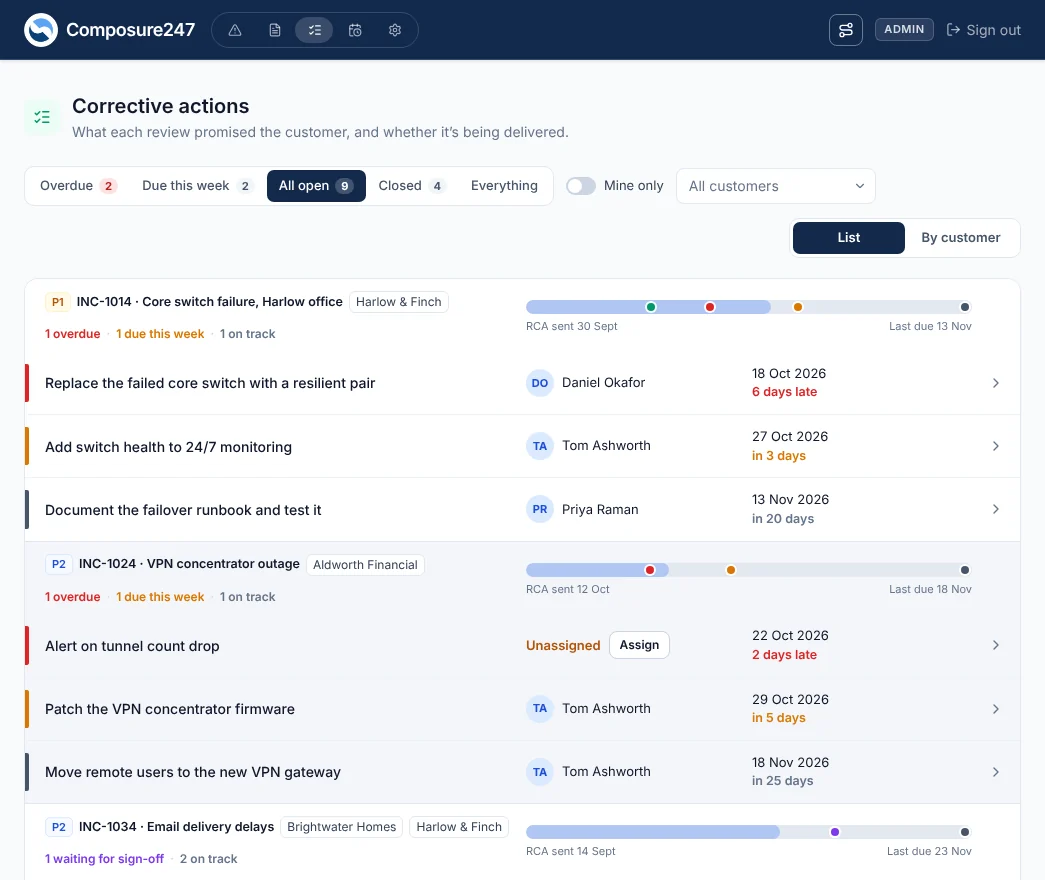
Each action from a sent RCA, with its owner and due date. Filter by overdue, due this week, open or closed, by customer, or just the ones you are accountable for.
The accountable person is told when the RCA is sent and reminded before the due date. Once an action is late the customer's CSM is told, and long-overdue actions are escalated.
Mark an action done with a note of what was done, move its date with a reason, flag it blocked, or mark it won't do. Won't do needs sign-off from a CSM or admin.
When every action on an RCA is done, a closure note is drafted for the customer saying what was delivered. It goes through your normal approval before it is sent.
Composure is AI-assisted, not AI-autonomous. Every AI-drafted incident update, maintenance notice and RCA is approved by a person before a customer gets it. The only exceptions are the automatic "service restored" and final "resolved" emails: "service restored" uses our fixed wording, "resolved" uses your own template, and both get a light AI polish.
Every communication sent and every approval given is recorded, so you can see who sent what to whom, and when.
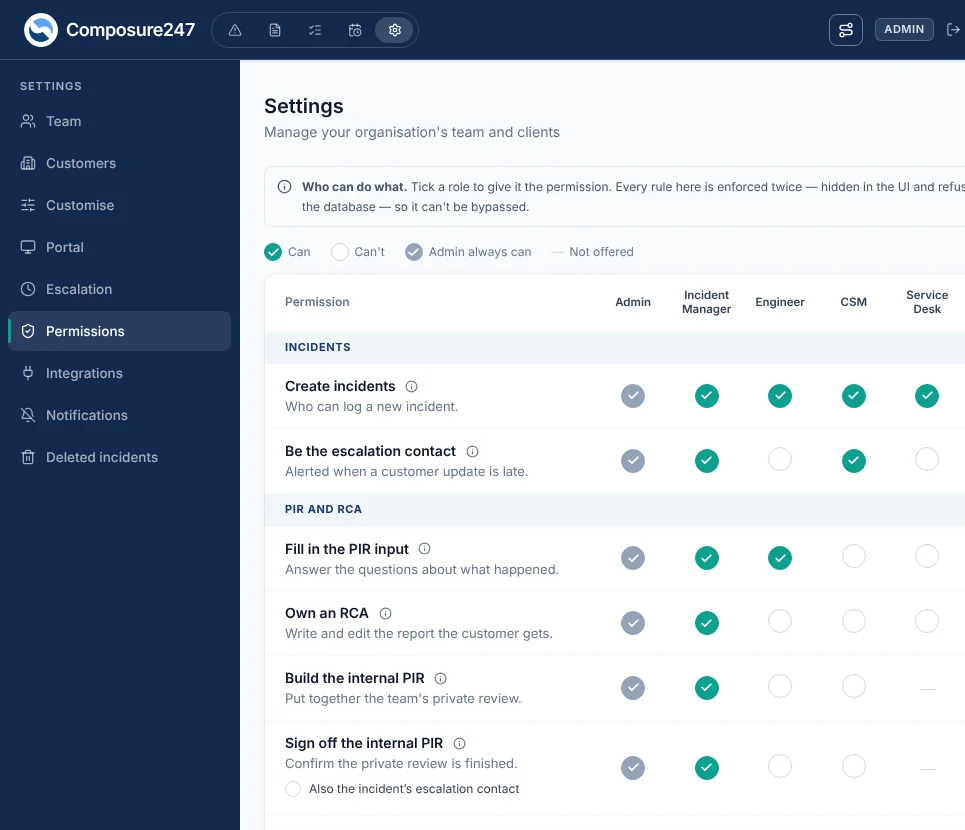
Role-based permissions control who can create, edit, approve and send. People can hold several roles.
Every AI-drafted update, maintenance notice and RCA waits as a draft until someone with the right role reads it, edits it if needed and sends it. The two automatic emails use our fixed "service restored" wording and your own "resolved" template, and "service restored" can be skipped.
Single sign-on with Microsoft Entra ID, and SCIM provisioning that maps your groups to Composure roles. On every plan.
Two-factor sign-in is mandatory for admins and can be required for all staff. You can also require it for a customer's portal contacts.
Pay monthly or annually, chosen when you subscribe. Change plan by request from inside the app, and see what your plan includes at any time.
See your plan and what it includes inside Composure, and ask for a change from the same screen.
Try Communicate free for 30 days with no card. The trial starts with customer notifications paused, so nothing reaches a customer until you go live.
Choose monthly or annual billing when you subscribe. Plan changes are by request to our team.
 Composure247